

The good news is that signing in to your account is very simple, with several convenient options. In this guide, we will walk you through each step, ensuring the process is smooth and hassle-free.
| Method | Description | Link |
|---|---|---|
| Mobile app | Dedicated app for Android, iOS, Huawei and Samsung devices | Download YesPlay App |
| Website | The easiest and most straightforward way to access YesPlay | YesPlay Website Login |
| Mobile Site | A no-download option for mobile users with small data-consumption | YesPlay Mobile Site Sign-in |
YesPlay Login Requirements
Before signing in with YesPlay, it’s essential to understand the terms and conditions of membership. By understanding and complying with these simple rules upfront, you’ll have no trouble signing in to your account:
- You must be a resident of South Africa. Logins from other locations may be blocked. The use of a VPN or proxy to hide your location is prohibited.
- You must have a stable Internet connection. All YesPlay features are available with a stable Internet connection. Offline login is not allowed.
- You must have an active mobile number. Login requires a valid South African mobile number, where you’ll receive one-time passwords for authentication.
To prevent any unnecessary delays or issues, we strongly recommend that you read and understand the entire T&C on the YesPlay website.
How to Sign In to Yesplay Website
It only takes a few seconds to complete the login process at YesPlay South Africa. Before you begin, you just have to make sure your internet connection is stable so there are no interruptions. You can also use any device you wish – a smartphone, tablet, laptop, or desktop PC – whichever is convenient for you would be fine.
Whether you use a desktop or mobile browser, the sign-in process is almost identical. The process is streamlined and user-friendly on both platforms, and goes as follows:
- Step 1. Launch the official YesPlay site. Follow the link we have posted and use any browser that you prefer.
- Step 2. Tap the Sign In/ Sign Up button. Click the orange button at the upper right of the screen to start the login process.
- Step 3. Fill in the form. Provide your South African phone number or sign in with an existing Google or Apple account.
- Step 4. Start betting. You'll be logged in automatically. Proceed to deposit and bet on sports events.
YesPlay Mobile App Login
Signing in to a YesPlay account through its mobile app is very fast and easy. First of all, the app is available for Android, Huawei, Samsung and iOS devices, so it’s super convenient for everyone since you can use the app whenever and wherever you are. Before you can enjoy the perks of the app, you need to download it, of course.
| Parameter | Technical requirements |
|---|---|
| Compatible operating systems | Android 6.0, iOS 12.0, Harmony 6.0 or later |
| System memory | At least 1GB RAM |
| Free device storage | Preferable 100MB of storage or more |
| Network connectivity | Requires stable internet connection |
Here is an easy-to-follow guide to everything we just described:
On your mobile device, click the official YesPlay link to open the site.

Click on the download link for your OS. Android users will immediately get the APK, while other users will be transferred to the corresponding app stores.

For Android, allow installations from unknown sources before installing. For iOS, Huawei and Samsung, follow the onscreen instructions.

Click on the orange Sign In/ Sign Up button at the upper right part of the screen and fill out the form.
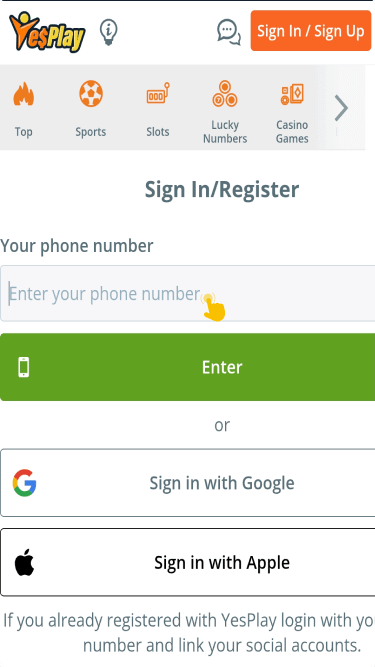
You don’t have to download the app if you prefer not to. Logging in on the YesPlay mobile website works perfectly fine as well.

